Git 中存储文件的推荐方法是什么?

虽然 Git 可以存储和处理任何类型的任何文件,但有些设置比其他设置效果更好。一般来说,我们建议将文本文件存储在 UTF-8 中,不带字节顺序标记 (BOM),并带有 LF(Unix 样式)结尾。我们还建议在提交消息中使用 UTF-8(同样,不带 BOM)。这些设置在各个平台上以及与git diff和git merge等工具配合使用时效果最佳。

此外,如果你可以在基于文本或非基于文本的存储格式之间进行选择,我们建议将文件存储在文本格式中,并在必要时将它们转换为其他格式。例如,每行一个记录的基于文本的 SQL 转储将比实际数据库文件更适合于差异和合并。类似地,基于文本的格式(如 Markdown 和 AsciiDoc)将比二进制格式(如 Microsoft Word 和 PDF)效果更好。

类似地,通常不建议在存储库中存储二进制依赖项(例如共享库或 JAR 文件)或构建产品。最好将依赖项和构建产品存储在工件或包服务器上,只将引用、URL 和哈希存储在存储库中。

我们还建议设置一个gitattributes文件来明确标记哪些文件是文本文件,哪些是二进制文件。如果你希望 Git 猜测,你可以设置属性text=auto。例如,以下内容可能适用于某些项目

# By default, guess.
*	text=auto
# Mark all C files as text.
*.c	text
# Mark all JPEG files as binary.
*.jpg	binary

这些设置帮助工具为输出(例如补丁)选择正确的格式,并导致文件以适合该平台的行尾签出。

via https://git.js.cn/docs/gitfaq

AI生成
Windows下如何安装Git?

Windows下安装Git需要在https://git-scm.com/download下载git for windows安装包

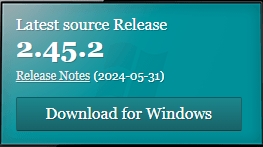
进入以上页面后,找到如下处,点击Download for Windows开始下载

Download for Windows

随后进入开始下载页面,但是从github源地址下载,国内访问异常的话可以 点击这里 通过国内线路下载。

git scm历史版本

安装完成后,在任意目录右键,点击Open Git Bash here打开terminal,输入git version查看当前git版本

alair@e64 MINGW64 /d/dt2
$ git version
git version 2.45.2.windows.1

AI生成

如何仅添加文件的部分内容?

git add --patch <file>

使用该命令会打开一个交互式界面,将每处不同的地区按照区块(hunk)的方式逐一显示,并提示你如何处理,从而达到仅添加部分内容的目的。

git add --patch package.json
diff --git a/package.json b/package.json
index 7a558a3..e03ce3f 100644
--- a/package.json
+++ b/package.json
@@ -2,7 +2,6 @@
   "name": "package",
   "version": "0.4.3",
   "description": "this is an example package",
-  "keywords": ["key", "middleware", "connect"],
   "repository": "git://github.com/foo/bar.git",
   "author": "jxt <info@gitfaq.cn> (http://gitfaq.cn)",
   "repository": "git://github.com/foo/bar",
Stage this hunk [y,n,q,a,d,/,j,J,g,e,?]? y

Stage this hunk [y,n,q,a,d,/,j,J,g,e,?]? 提示如何处理当前区块(hunk),输入?可查看帮助信息

y - stage this hunk 暂存此区块
n - do not stage this hunk 不暂存此区块
q - quit; do not stage this hunk or any of the remaining ones 退出;不暂存包括此块在内的剩余的区块
a - stage this hunk and all later hunks in the file 暂存此块与此文件后面所有的区块
d - do not stage this hunk or any of the later hunks in the file 不暂存此块与此文件后面所有的区块
g - select a hunk to go to 选择并跳转至一个区块
/ - search for a hunk matching the given regex 搜索与给定正则表达示匹配的区块
j - leave this hunk undecided, see next undecided hunk 暂不决定,转至下一个未决定的区块
J - leave this hunk undecided, see next hunk 暂不决定,转至下一个区块
k - leave this hunk undecided, see previous undecided hunk 暂不决定,转至上一个未决定的区块
K - leave this hunk undecided, see previous hunk 暂不决定,转至上一个区块
s - split the current hunk into smaller hunks 将当前的区块分割成多个较小的区块
e - manually edit the current hunk 手动编辑当前的区块
? - print help 输出帮助

via https://gitfaq.org/1/01/how-do-i-add-only-a-portion-of-a-file/